europa

German PCmeasure project


New: PCMeasure Ethernetbox with ports for 4 sensors and individual IP address support SNMP also

our Catalog with all components - order direct at this page

download a PlugIn for Nagios

download a script and a template for cacti

Torrus Framework does support our Ethernetbox SNMP MIB

For our Japanese customers: system description and price list from Jupiter Technology Corp.

another Japanese site about  PCMeasure from Ipros

PCMeasure system was Featured product of the monthby
www.temperatures.com


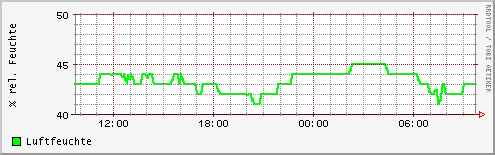
This graphics were created live with PCMeasure and RRDTool.  They show indoor (red) and outdoor (blue) temperature and humidity (green). With RRDTools, unlike MRTG,it is not a problem to show negative values. RRDTools are free available for Unix and Windows.

rrdtool 

Click picture to see weekly and monthly graphs

rrdtools  

RRDTool Database was created with this command:

./rrdtool create messpc.rrd DS:aussentemp:GAUGE:600:U:U DS:innentemp:GAUGE:600:U:U DS:feuchte:GAUGE:600:U:U RRA:AVERAGE:0.5:1:5040 RRA:AVERAGE:0.5:12:9600

To read data from PCMeasure and write to database you can use this script (called by crontab):

File pcmeasure2rrd.pl
#!/usr/bin/perl
#############################################################
#  pcmeasure2rrd.pl  Zugriff auf Daten der MessPC Software
#                    über das Netzwerk und Übergabe an RRDTool
#
#  Version 1.0 vom 4.1.2003
#
#  (C) Lutz Schulze 2003 www.pcmeasure.com
#
#  Aufruf: pcmeasure2rrd.pl
#
#############################################################

use IO::Socket;
use Text::ParseWords;
sub parse_csv {
   return quotewords(";",0, $_[0]);
}

$remote_host = "10.254.89.8"; # IP-address
$remote_port = 4000;     # TCP Port
$port = "com2.2";
$socket = IO::Socket::INET->new(PeerAddr =>$remote_host,
                               PeerPort =>$remote_port,
                               Proto        =>"tcp",
                               Type         =>SOCK_STREAM)
or die "cannot connect to $remote_host:$remote_port: $@\n";

print $socket "pcmeasure.$port\n";
$answer = <$socket>;
@fields = parse_csv($answer);
for ($i =0;$i < @fields;$i++) {
   $pos1 =index $fields[$i],'value';
   if ($pos1  != -1) {
       $pos2 =index $fields[$i],'=';
       $valuestring1 = substr($fields[$i],$pos2+1);
   }
}
close($socket);

#print "$valuestring1\n";


$remote_host = "10.254.89.8"; # IP-address
$remote_port = 4000;     # TCP Port
$port = "com2.1";
$socket = IO::Socket::INET->new(PeerAddr =>$remote_host,
                               PeerPort =>$remote_port,
                               Proto        =>"tcp",
                               Type         =>SOCK_STREAM)
or die "cannot connect to $remote_host:$remote_port: $@\n";

print $socket "pcmeasure.$port\n";
$answer = <$socket>;
@fields = parse_csv($answer);
for ($i =0;$i < @fields;$i++) {
   $pos1 =index $fields[$i],'value';
   if ($pos1  != -1) {
       $pos2 =index $fields[$i],'=';
       $valuestring2 = substr($fields[$i],$pos2+1);
   }
}
close($socket);

#print "$valuestring2\n";


$remote_host = "10.254.89.1"; # IP-address
$remote_port = 4000;     # TCP Port
$port = "com1.2";
$socket = IO::Socket::INET->new(PeerAddr =>$remote_host,
                               PeerPort =>$remote_port,
                               Proto        =>"tcp",
                               Type         =>SOCK_STREAM)
or die "cannot connect to $remote_host:$remote_port: $@\n";

print $socket "pcmeasure.$port\n";
$answer = <$socket>;
@fields = parse_csv($answer);
for ($i =0;$i < @fields;$i++) {
   $pos1 =index $fields[$i],'value';
   if ($pos1  != -1) {
       $pos2 =index $fields[$i],'=';
       $valuestring3 = substr($fields[$i],$pos2+1);
   }
}
close($socket);

system("/usr/local/rrdtool-1.0.40/bin/rrdtool","update","/home/lutz/messpc.rrd","-t","aussentemp:innentemp:feuchte","N:$valuestring1:$valuestring2:$valuestring3");
#print "$valuestring3\n";

graphs are created with this command (called by crontab):

/usr/local/rrdtool-1.0.40/bin/rrdtool graph /usr/local/httpd/htdocs/mrtg/rrdtempday.gif  -v "Grad Celsius" DEF:aussentemp=/home/lutz/messpc.rrd:aussentemp:AVERAGE DEF:innentemp=/home/lutz/messpc.rrd:innentemp:AVERAGE LINE2:aussentemp#0000FF:"Aussentemperatur" LINE2:innentemp#FF0000:"Innentemperatur"

/usr/local/rrdtool-1.0.40/bin/rrdtool graph /usr/local/httpd/htdocs/mrtg/rrdfeuchteday.gif -v "% rel. Feuchte" DEF:feuchte=/home/lutz/messpc.rrd:feuchte:AVERAGE LINE2:feuchte#00FF00:"Luftfeuchte"
 

The magazine ‘IT-Administrator’ has tested the PCMeasure system and published a multi-page report.

Contact: better networks  Lutz Schulze Hauptstrasse 34  D-01909 Grossharthau-Buehlau, Germany     more information
Tel. +49 35954 53396         Fax +49 35954 53397       e-mail lschulze@pcmeasure.com