Anzeige der Temperatur Messwerte in HTTP Dokumenten im Browser
Durch den in der Windows-Software eingebauten Webserver ist es möglich, auf einzelne grafische Komponenten der Software zuzugreifen und diese im Webbrowser anzuzeigen.
Zum einen kann die gesamte Ansicht des Programmes im Browser dargestellt werden. Dazu wird folgender HTML-Code verwendet:
<img src=pcmeasure.jpg>
Alle Grafiken werden im Moment der Abfrage dynamisch mit den aktuellen Daten erzeugt. Die Farbe und Grösse der Elemente kann in der MessPC-Software konfiguriert werden.


Zum einen kann die gesamte Ansicht des Programmes im Browser dargestellt werden. Dazu wird folgender HTML-Code verwendet:
<img src=pcmeasure.jpg>
Alle Grafiken werden im Moment der Abfrage dynamisch mit den aktuellen Daten erzeugt. Die Farbe und Grösse der Elemente kann in der MessPC-Software konfiguriert werden.
Die Displays für einzelne Messtellen lassen sich als
display1.jpg bis display12.jpg anzeigen und mit
<img src=display1.jpg>
in eine Webseite einbauen.
display1.jpg bis display12.jpg anzeigen und mit
<img src=display1.jpg>
in eine Webseite einbauen.
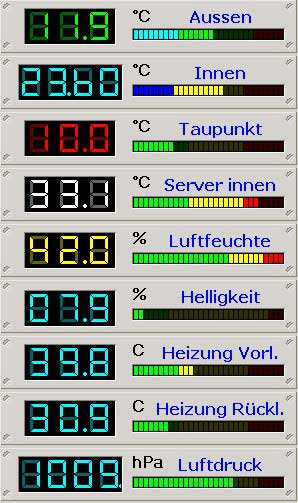


Einzelne LED-Anzeigen können Sie mit leddisplay1.jpg bis leddisplay12.jpg darstellen
<img src=leddisplay1.jpg>
<img src=leddisplay1.jpg>

Auch die Balken-Anzeigen lassen sich als bargraph1.jpg bis bargraph12.jpg abfragen. Die Richtung der Balken läßt sich ebenfalls konfigurieren.
<img src=bargraph1.jpg>
<img src=bargraph1.jpg>
Binden Sie diese Grafiken doch beispielsweise einfach in den
Active Desktop von Windows ein!